Employee Time-Clock (Pontaj)
A standalone time-clock for any company: staff clock in with a PIN and a selfie on a tablet, and hours — including premiums — are calculated automatically, by the book.
Time-Clock APPY is a standalone time-tracking system that works on its own — for any company with employees, not just hospitality — or alongside Appy POS if you already have it. An employee identifies with a 6-digit PIN and a live (non-biometric) selfie on a tablet and records arrival, departure and breaks. The system automatically computes regular, overtime, night, weekend and holiday hours with your configured premiums, and rolls them into an approvable monthly timesheet. You plan shifts and minimum coverage per department, track live presence and reports, and staff manage their own hours and leave requests. Staff can also clock in from their own phone (with GPS geofencing), managers get automatic alerts, and every feature is toggled on per location — all with an immutable audit log, a record of working time that fits Romanian labor law, with no paper and none of the legal risk of biometric time-clocks.
Get a Free Demo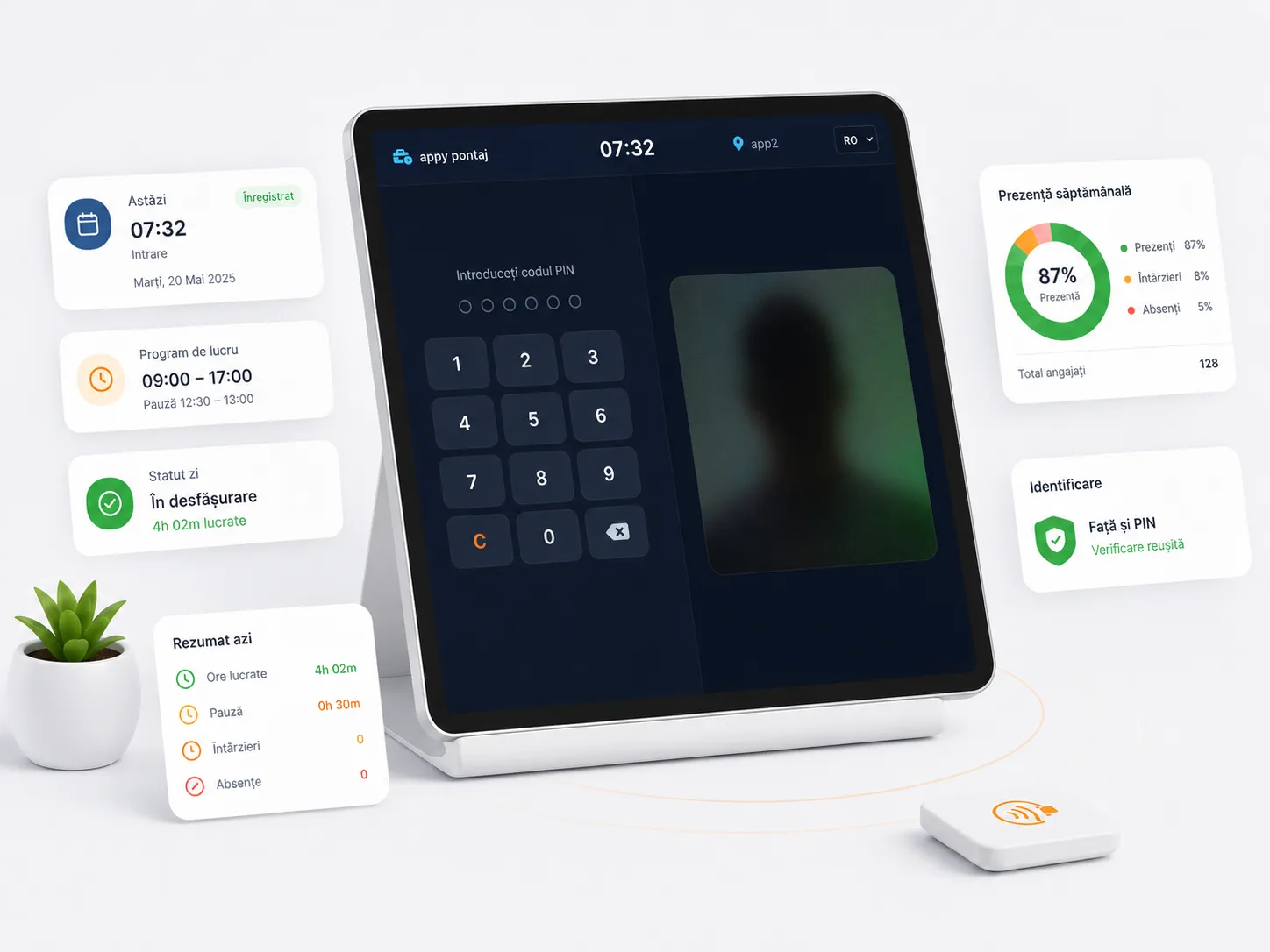
300+ restaurants already use APPY POS
What is digital timekeeping and which obligations does it cover?
Digital timekeeping records each employee’s clock-in and clock-out electronically and computes the hours automatically — regular, overtime, night, weekend and public holiday — under Romanian labour law. It replaces the paper register and produces the monthly timesheet without manual calculation.
- Clock-in on a tablet with a PIN and a selfie, no biometric data
- Automatic calculation of overtime, night and holiday hours
- Shift planning and minimum cover per department
- Live attendance and leave tracking
- A monthly timesheet, exportable to Excel
- An audit log that cannot be edited retroactively
It also runs standalone, separately from the rest of the platform, for any company with employees — not only in hospitality.
Challenges
- Paper or spreadsheet time-tracking is easy to fake and hard to justify in a labor inspection.
- Calculating overtime, night, weekend and holiday hours is time-consuming and error-prone.
- Biometric time-clocks (fingerprint/face) are legally risky — sanctioned by the data-protection authority.
- You have no clear, immutable record of who clocked in, when and where.
With APPY
- A daily per-employee record of hours that fits labor law and is ready for a labor inspection.
- Regular, overtime, night, weekend and holiday hours — computed automatically, with your premiums.
- PIN + non-biometric selfie identification — GDPR-safe, without the risk of fines.
- An immutable audit log: every punch and every correction, with a mandatory reason.
Results
For any company with staff
Features
Standalone — Kiosk on Any Tablet
Runs as a standalone app ("time-clock only"), independent of the POS, or alongside Appy POS. Any tablet switches into "time-clock mode", with no fingerprint reader and no separate terminal — zero special hardware.
Clock in with PIN + Selfie
Staff record arrival, departure and breaks with a 6-digit PIN and a live selfie. The selfie is non-biometric (a photo for human review, no facial recognition) and can be turned on or off per location.
Labor-Law Hour Calculation
Regular, overtime, night (22:00–06:00), weekend and public-holiday hours, computed automatically. Premiums are configurable (defaults: night 25%, overtime 75%, holidays 100%), as are the daily norm and weekly cap.
Monthly Timesheet
All shifts roll into a monthly per-employee timesheet that a manager can review, approve and lock. Totals by hour type are ready for payroll.
ITM Sheet — Collective Attendance Report
Generate the collective attendance sheet in the official Romanian format: company, location, month and a per-day grid (CO/CM/absence codes, colored weekends) plus totals. "Print / PDF" produces an A4 document ready to present in a labor inspection.
Leave & Absences
Paid leave, sick leave and other absence types are entered and appear directly in the monthly grid, for a complete attendance picture.
Shift Scheduling (Roster)
A weekly planning grid: assign shifts to staff and locations, compare planned vs. actual and publish the schedule to the team.
Departments & Minimum Coverage
Define departments and the minimum number of staff needed per department and shift. While planning you get warnings when a shift is under-covered, and leave requests take coverage into account — so you never hit the rush short-handed.
Employee Self-service
Each employee sees their own hours and leave balance and submits leave or day-off requests right from the app, with no trips to the office.
Mobile Punch with Geofencing
Staff can clock arrival, departure and breaks from their own phone ("My attendance"), not just the tablet. With GPS geofencing, mobile punching is allowed only within the location radius (configurable center and radius) — a real anti-fraud safeguard.
QR Code Punch
Staff clock in by scanning the location QR code — fast, with no PIN to type. The on-tablet code rotates periodically (anti-copy), and scanning also works from the phone.
Automatic Alerts
Managers get alerts for unclosed shifts, missing punches and pending leave requests — so nothing about the team's attendance slips through.
Live Presence & Reports
See who is on shift in real time, plus dashboards for hours, calendar and coverage. Reports give a clear view of attendance, lateness and staffing costs.
Immutable Audit & Anti-fraud
Punches are append-only, and any correction requires a reason and stays in the audit log. A per-device counter detects attempts to tamper with the clock.
How it works
Enable time-clock mode
Enable time-clock mode
The administrator puts the tablet into time-clock mode and picks the location. The tablet stays dedicated to clocking until an admin exits the mode.
Staff clock in
Staff clock in
They enter the PIN, take a selfie and choose the action: arrival, departure, start or end of break. Confirmation takes a few seconds.
Hours compute automatically
Hours compute automatically
The system derives the shift, splits time by hour type and applies the premiums per the rules configured for that location.
The manager approves the monthly sheet
The manager approves the monthly sheet
At month-end, the manager reviews attendance, corrects it (with a reason, in the audit log) if needed and approves the sheet — ready for payroll.
Frequently asked questions
Track time correctly and by the book
Ditch paper time-sheets: secure identification, automatic hour calculation and a timesheet ready for payroll.
Get a Free Demo