Restaurant Delivery System: Your Own Drivers and Wolt Couriers
Manage your own delivery fleet or use on-demand couriers from Wolt Drive and Glovo — all from one screen.
APPY Delivery gives restaurants complete control over last-mile logistics. Manage your in-house courier fleet with GPS tracking, or call an on-demand Wolt Drive courier from the POS. Define delivery zones, give your drivers a native app, and track every order from kitchen to doorstep.
Start Delivering SmarterTransparent pricing: Starter 0 € · Appy POS from 49 €/mo · See pricing

300+ restaurants already use APPY POS
What is a restaurant delivery system?
A restaurant delivery system covers the order’s path from confirmation to the customer’s door: the zones you deliver to and the fee for each, assigning the order to one of your own drivers or to a Wolt courier called on demand, and following it on the map to the end. Orders can come from your own channel or from Glovo, Wolt and Bolt Food, in the same screen.
- Delivery zones drawn on a map, each with a fee and a minimum order
- Assignment from the POS, or orders taken by the driver in the app
- Drivers work in the POS in their phone’s browser, or in Courier App on Android and iPhone
- Own-channel and Glovo/Wolt/Bolt Food orders in one place
- Third-party couriers via Glovo on Demand, Wolt Drive, Frogo, Tookan and Dr. Carmen
- Estimated delivery times shown to the customer
Challenges
- Managing in-house couriers via phone calls and WhatsApp is chaotic and unscalable
- No visibility into courier location, estimated arrival, or delivery status
- Peak demand overwhelms your fleet, but hiring more full-time drivers is too expensive
- Delivery zone logic and fee calculation is done manually or not at all
With APPY
- The dispatcher assigns orders from the POS and the driver gets them on the phone, with no calls
- Real-time GPS tracking shows every courier on a live map with ETA updates
- Request a Wolt Drive or Glovo On Demand courier from the POS when your fleet is at capacity
- Automated zone-based delivery fees, minimum order enforcement, and time estimates
Your drivers: in the browser or in the app
Your own drivers can work in two ways, on the same POS orders. You can use both in the same restaurant.
POS driver mode, in the browser
Nothing to install: the driver signs in to the POS on their phone with their staff account, and driver mode opens by itself. You can start today.
- A full-screen map with their orders and, if you allow it, the unassigned ones
- One slide per status change, navigation in Waze or Google Maps
- Scanning the QR code on the ticket and announcing a delay
- Tickets set to print on a status change print, as from any POS
The location is sent while the page is open. On an iPhone, the browser stops it when the screen locks.
Courier App, the native app
On Android and iPhone. The driver signs in with their username and their own password, which the phone remembers.
- A notification for every order assigned to them while “On duty”
- The location keeps going with the screen locked: every 15 seconds with orders to deliver, every 60 otherwise
- The next stop on top, one slide per status, unassigned orders, QR and delay
- Off duty, it sends no location and gets no notifications
It does not print tickets on a status change: a restaurant that prints from the driver’s phone stays on the browser mode for now.
See Courier AppEither way, the dispatcher assigns from the POS the same way, and the order status and the driver’s location show the same on the POS map and in the customer’s tracking link.
Results
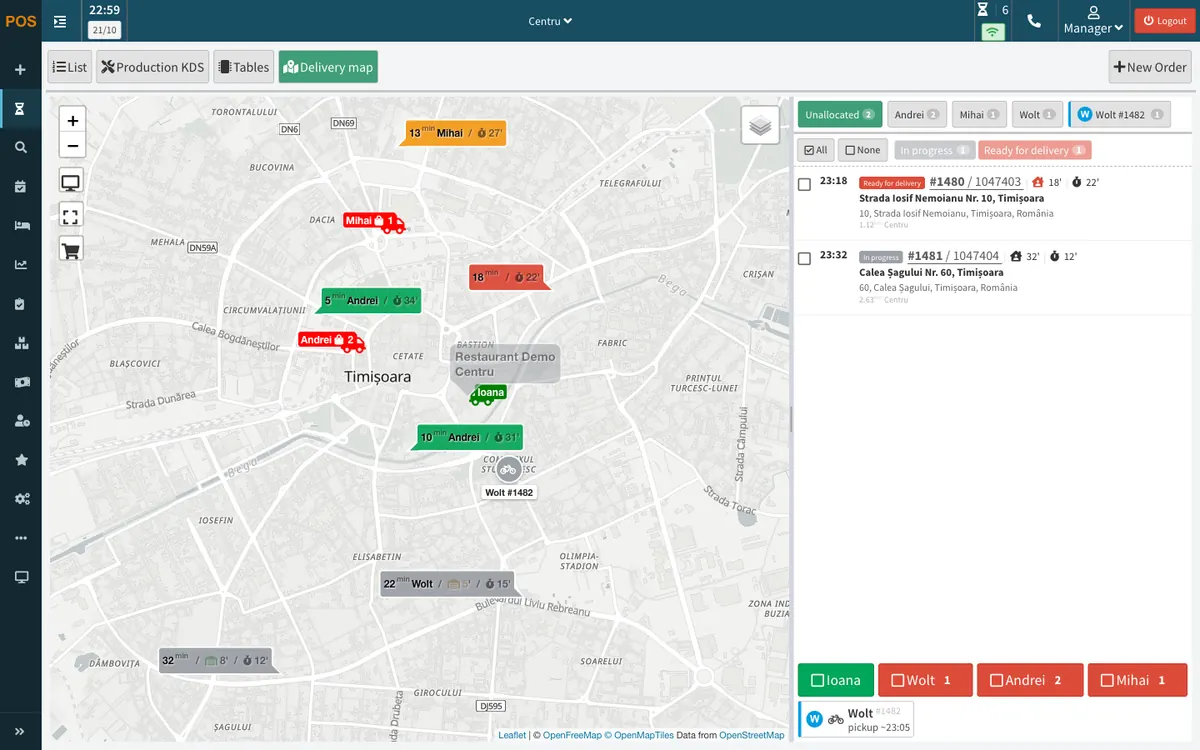
The delivery map in the POS
See your delivery orders, your own drivers and the Wolt couriers on one map: who carries which order, how many minutes until the customer, and what is still unassigned.
- Unassigned orders apart, with the address and the promised time
- Each driver with their orders and the minutes to the customer
- Wolt couriers on the map, with the time at the restaurant and at the customer
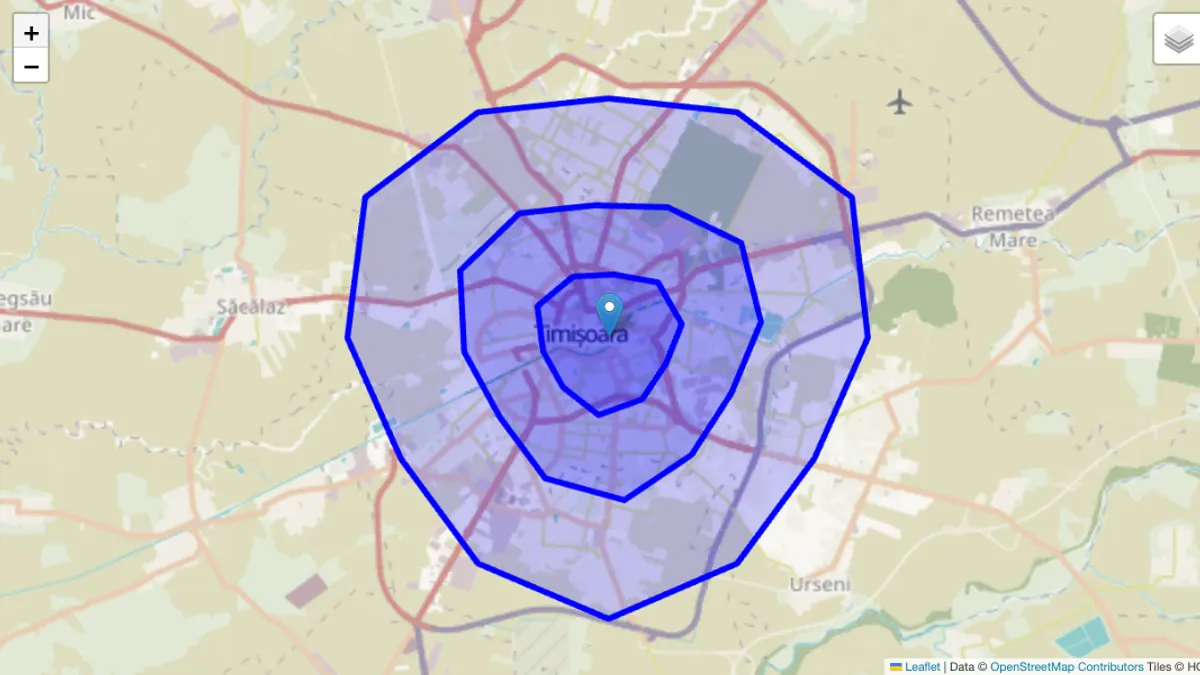
Delivery zones drawn on the map
In the Admin you draw the zones you deliver to and set, for each, the delivery fee, the minimum order, the free-delivery threshold and the estimated time.
- A fee and a minimum order for each zone
- Free delivery above an amount you choose
- When an order comes in, the system checks the zone and estimates the time
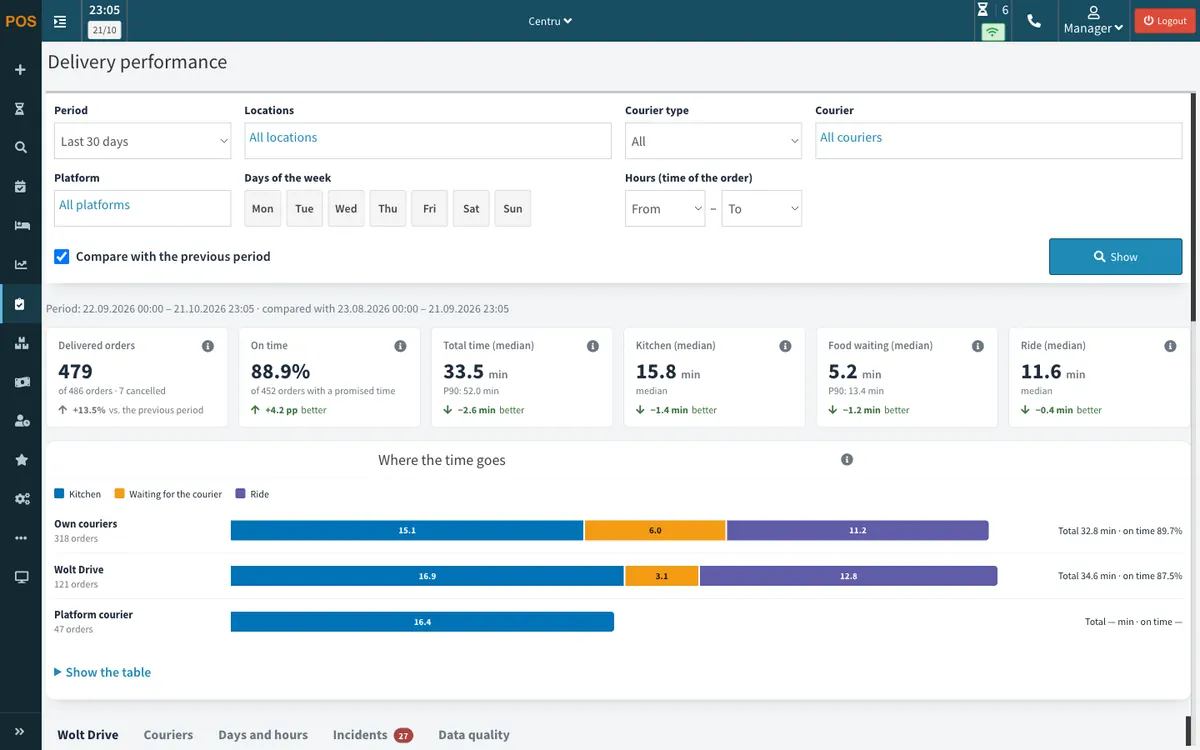
Delivery performance
In the Control section of the POS you see how long deliveries take and where the time goes: in the kitchen, waiting for the courier or on the road. Separately for your own drivers, for Wolt Drive and for the platforms’ couriers.
- Orders delivered on time, against the previous period
- Times per driver and by day and hour
- Incidents: a late courier, food left waiting
Features
In-House Fleet Management
Register your couriers, assign orders from the POS or let them take ready orders in the app, and track each delivery on a live map. Monitor active, completed, and returned deliveries.
Wolt Drive Integration
When none of your drivers is free, you pick "Wolt" as the driver on the order and press "Save": APPY calls a Wolt Drive courier at the status you chose, paid per delivery from your own Wolt Drive account. Wolt picks the order up and delivers it, with no fleet of your own.
How Wolt Drive works in APPYGlovo On Demand Integration
Glovo On Demand can be linked too, as another on-demand courier called from the POS, on your own Glovo account, and so can Dr. Carmen.
Delivery Zone Editor
Draw polygon zones on a map, assign delivery fees and minimum order values per zone, and set estimated delivery times. Customers outside your zones see pickup-only.
Live Order Tracking for Customers
Customers receive a tracking link showing courier location and estimated arrival. Reduce "Where is my food?" calls to near zero.
Driver App
Your drivers use Courier App on Android or iPhone: a notification for each order assigned to them, navigation to the address, a slide for each status change, and their GPS location shared while on duty.
How it works
Set Up Delivery Zones
Set Up Delivery Zones
Draw your delivery areas on APPY's map editor. Configure fees, minimums, and estimated times for each zone.
Connect Couriers
Connect Couriers
Add your in-house drivers to the system and/or have the APPY team link your Wolt Drive account. Your drivers sign in to Courier App with their username.
Wolt Drive couriers, on demandDispatch & Track
Dispatch & Track
When a delivery order arrives, the dispatcher assigns it to a driver from the POS, or requests an on-demand courier when nobody is free. Track every step from kitchen to doorstep.
Glovo, Wolt and Bolt Food orders, straight into the POSDeliver with your own fleet, commission-free
Frequently asked questions
Take control of your deliveries
Manage your fleet, tap into Wolt Drive & Glovo, and track every order live.
Start Delivering Smarter