Your Own Delivery Service, Without Hiring Couriers
The orders, prices and customers stay yours. A Wolt courier comes when you call one from APPY POS.
With Wolt Drive in APPY POS, the delivery is yours and the courier comes on demand. The order comes in from your website or app, by phone or in the POS, at your prices. You put the "Wolt" driver on the order, and the POS calls the courier exactly when you chose. You pay per delivery and see it all: where the courier is, when they reach the customer and what they collect.
Request a Demo- Driver: "Wolt"
- The Wolt courier is requested by itself
- At the customer: ~12:58, on the POS map
The delivery is yours. The courier comes on demand.
300+ restaurants already use APPY POS
How do I deliver with Wolt couriers from APPY POS?
You need a Wolt Drive account, a contract with Wolt, and the APPY team links it to your POS. Orders come in as now: from your website or app, by phone or in the POS. You put the "Wolt" driver on an order, and APPY calls the courier when the order reaches the status you chose. You pay per delivery.
- An on-demand courier: your own delivery, without a fleet
- The courier is requested by itself, at "In progress" or at "Ready for delivery"
- The order's statuses change by themselves, as Wolt reports them
- The customer gets a text from Wolt with the tracking link
- On the POS map: the courier, their stage and the estimated time at the customer
- The courier collects the cash, and Wolt pays you by bank transfer
Wolt sets the price of each delivery, by distance, under your contract with Wolt.
Easy, flexible, under control
You do not hire drivers and you do not hand the order to a portal. You choose when the Wolt courier comes, and you see what happens to every order.
Easy
You call the courier from the POS you already use. Nothing new to learn.
- You send us your Wolt Drive account details, and the APPY team does the setup.
- You pick "Wolt" as the driver and press "Save", from the order window, the list or the map. At the status you chose, the courier is requested by itself.
- The order's statuses change by themselves, as Wolt reports them.
- The customer gets a text from Wolt with the tracking link.
- A cash payment moves to "Virament WoltDrive" (bank transfer) by itself when Wolt takes the delivery.
Flexible
You decide when the courier comes, and for which orders.
- The courier is called while the order is "In progress", to arrive around the time it is ready, or only once it is "Ready for delivery".
- You can tick both statuses, and the order still requests a single courier.
- An order that is ready goes to Wolt with 0 minutes of preparation, so the courier comes at once. While it is still in progress, you confirm in the POS how many minutes it needs.
- You mix Wolt couriers with your own drivers, order by order. If Wolt turns a delivery down, you request it again or give it to one of your drivers.
- Settings are made per location.
Under control
You see what the courier is doing and what happened to every order.
- On the POS map: the Wolt courier, the stage they are at and the estimated times at the restaurant and at the customer. While carrying other orders, they show greyed out.
- A courier carrying several orders shows up once.
- The order history keeps everything Wolt reported, and when.
- The cost of every delivery shows on the map and in the sales reports.
- In Control → Delivery performance you see the delivery times, for your own drivers and for external couriers, and the statement for the Wolt invoice, with export.
What it looks like in the POS
The way of an order sent with Wolt Drive, from the kitchen to the customer's door, in four steps.
- 1
The order in progress
- Order #1482 · "In progress"
- Driver: "Wolt"
You pick "Wolt" as the driver, from the order window, the list or the delivery map, and press "Save".
- 2
The courier is called
- APPY requests the courier from Wolt
- In the history: "Order SENT to WOLT"
- To the customer: a text with the tracking link
When the order reaches the status you chose, the courier is requested by itself. Wolt texts the customer the tracking link.
- 3
The courier on the map
- Wolt courier · heading to the restaurant
- At the restaurant: ~12:41
- At the customer: ~12:58
On the delivery map you see the courier, their stage and the estimated times. When they pick the order up, it moves to "Picked up by driver" by itself, then to "Out for delivery".
- 4
Delivered, with its cost
- Wolt confirms the delivery
- The order closes by itself
- The delivery cost, saved on the order
The delivery Wolt confirms closes the order, and the history keeps everything Wolt reported. The cost of the delivery shows on the map and in the reports.
A drawing, not a screenshot. The order and the times are examples.
Challenges
- Hired drivers cost money in the quiet hours too, and at lunch and dinner there are still not enough of them.
- Orders handed to portals come with a commission, and the customer stays the portal's.
- You do not know where the courier is, or when they will reach the customer.
- Cash collected by couriers is slow to gather and hard to check.
- The courier's invoice is hard to check, order by order.
With APPY
- A Wolt courier comes only when you call one, and you pay per delivery. You mix them with your own drivers, order by order.
- The order stays yours: it comes from your website or app, by phone or in the POS, at your prices. The customer stays yours.
- On the POS map you see the Wolt courier, their stage and the estimated times at the restaurant and at the customer.
- The courier collects the amount the POS sent from the customer, and Wolt pays you by bank transfer.
- The cost of every delivery is saved on the order, and for the Wolt invoice you get a statement per location, with export.
Results
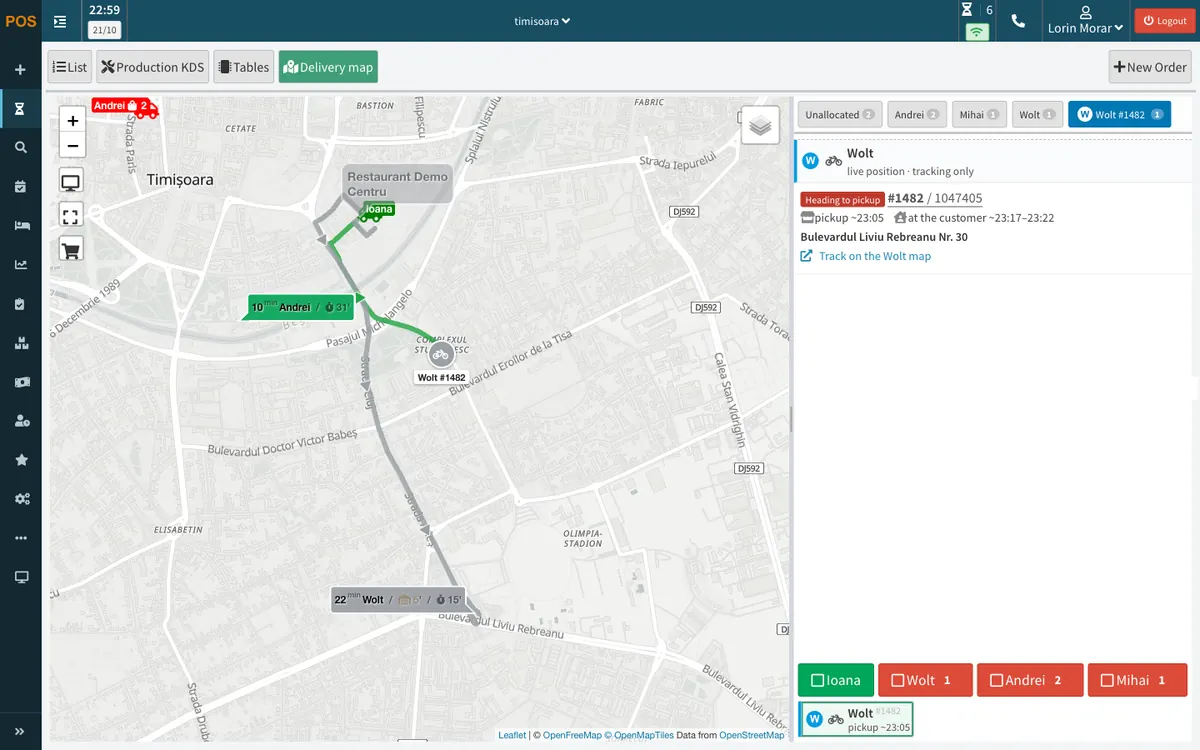
The Wolt courier on the POS map
The courier shows on the delivery map with the route to the restaurant and to the customer. Their tab shows the stage, the pickup time, the estimated time at the customer and the Wolt tracking link.
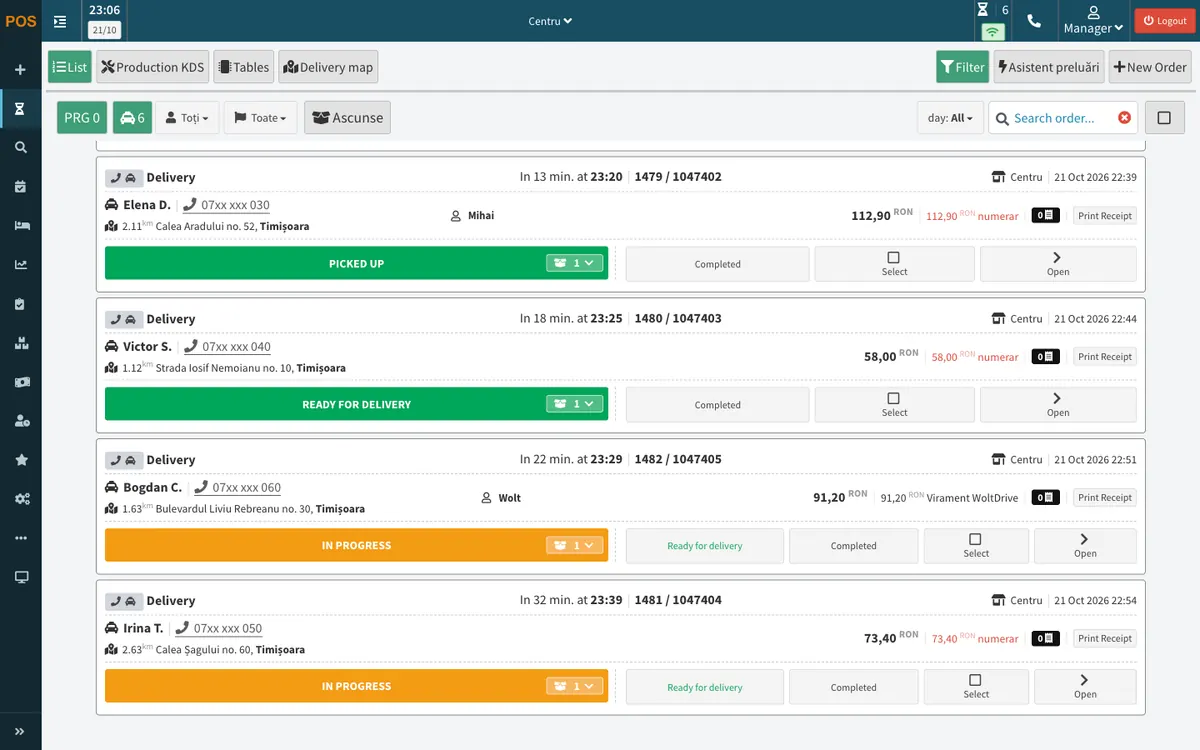
The order sent to Wolt
In the order list the order carries the driver "Wolt". The cash payment has moved by itself to "Virament WoltDrive" (bank transfer), and the status changes as Wolt reports it.
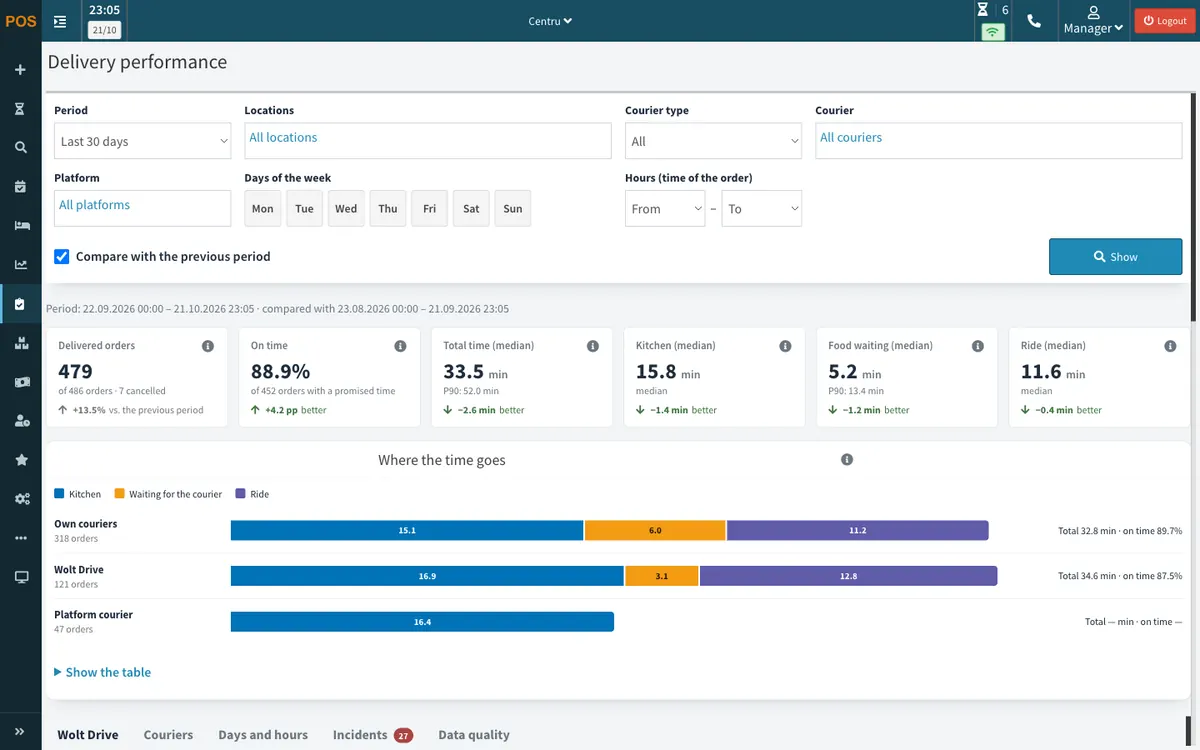
Wolt couriers' times, next to your own drivers
In Control → Delivery performance you see how long Wolt Drive deliveries take compared with your own drivers' deliveries: the kitchen, the wait for the courier and the ride. The Wolt Drive tab adds the statement per location for checking the Wolt invoice, with export.
Features
The courier called from the POS
You pick "Wolt" as the driver, from the order window, the list or the delivery map, and press "Save". The courier is requested by itself when the order reaches the status you chose: "In progress" or "Ready for delivery".
Preparation time
Wolt gets the time according to the order's status: an order that is ready means a courier at once. While it is still in progress, the POS asks how many minutes it needs and sends the minutes you confirm. When the order moves to "Ready for delivery", Wolt learns the food is ready for pickup.
A text for the customer
Wolt sends the customer a text with the delivery tracking link. The text is fixed and in Romanian.
Statuses change by themselves
When the courier picks the order up, it moves to "Picked up by driver". When they head to the customer, it moves to "Out for delivery". When Wolt confirms the delivery, the order closes.
The Wolt courier on the map
On the POS delivery map you see the courier's position, their stage, the estimated time at the restaurant and at the customer, and the tracking link. A courier carrying several orders shows up once. The APPY team switches the position on, on request. Wolt gives neither the courier's name nor their phone number.
The courier greyed out on the map
While the Wolt courier is carrying other orders, they show greyed out on the map. They stay grey until they head to your customer.
Cash, by bank transfer
The Wolt courier collects the amount the POS sent from the customer, and Wolt pays you by bank transfer.
The order history
The history shows what Wolt reported and when: the courier, the estimated times and every status.
Your Wolt Drive account
You need a Wolt Drive account of your own, that is a contract with Wolt. APPY links it to the POS. Wolt sets the price of each delivery, by distance.
One delivery per order
You can tick both sending statuses, and the order still requests a single courier. If Wolt turns the delivery down, the order history says so and "Wolt" comes off the order: you request it again or give it to one of your drivers.
Cash moved to bank transfer
A cash payment moves to "Virament WoltDrive" (bank transfer) by itself when Wolt takes the delivery, and moves back if you cancel the delivery from the POS. If the receipt was already printed, the POS asks you first and prints a cancellation record, and you print the new receipt with one tap.
The cost of every delivery
The cost is saved when you call the courier and shows on the map for those allowed to see payments, and in the sales reports, in a column of its own. For the Wolt invoice you get, in Control → Delivery performance, a statement per location: requests, delivered, cost, order value, cash collected by the courier and deliveries not made, with the list per order and export.
How it works
You send us your Wolt Drive account details
You send us your Wolt Drive account details
The codes Wolt gives you for each location. The APPY team does the rest of the setup.
We link the account to your POS
We link the account to your POS
The APPY team links the account and chooses with you when the courier is called: while the order is "In progress" or once it is "Ready for delivery". Then you send a test order.
The order comes in, the POS calls the courier
The order comes in, the POS calls the courier
You pick "Wolt" as the driver and press "Save". At the status you chose, the courier is requested by itself, and the customer gets a text from Wolt.
You follow it, get paid and check the cost
You follow it, get paid and check the cost
You see the courier on the map, the statuses change by themselves, and Wolt pays you the cash collected by bank transfer. The cost of every delivery is in the reports, with the statement for the Wolt invoice.
Frequently asked questions
Deliver with Wolt couriers, from APPY POS
Tell us how many deliveries you have a day and how you make them today, and we will show you how to call a Wolt courier from the POS, on your restaurant's orders.
Request a Demo